
Fixing Double Log Entries and Cache Issues
While messing with the compression settings yesterday, I ended up opening the Apache configuration files and decided to check all the other settings against the actual responses. I found two discrepancies. First, the access logs were recording every request twice. Second, even though static files had a one-year cache set, 36% of the image transfer volume was coming from re-requests.
If you just read the configuration files, both look fine. The log section even had a comment saying, "Log optimization for performance." The issue wasn't within the files themselves, but rather in the relationship
Why My Access Logs Were Ballooning to 199MB Per Week, With 31.4% Duplicates
Apache determines where and in what format to record logs using a single line in the
CustomLog. On this server, I had two such lines. One was in the main configuration file, and the other was in a file I added later, and both pointed to the same log file.httpd.conf : CustomLog "logs/access_log" combined
logging.conf : CustomLog /var/log/httpd/access_log common env=!dontlogWhen Apache encounters multiple
CustomLog directives, it executes them all in order. It doesn't ignore the subsequent ones. Consequently, every single incoming request resulted in two entries being written to the same file.I read through an entire week's worth of log files and counted the two formats to see the difference. I distinguished the formats by checking if they included the referrer and the browser name.
Out of the 199MB generated weekly, about 62.5MB was just logging the same request again, either immediately before or after. What's more, the duplicated entries contained less information. The 'common' format lacks both the referrer and the browser name. Since this server keeps logs for four weeks, we were accumulating four times this amount of waste, and the entire
/var/log/httpd directory was 757MB.
Why the Line Counts Didn't Match Exactly
The count for the two formats—668,921 and 637,340—was off by 31,581 lines. If both lines were logging the exact same request, the numbers should have matched. The difference came down to the
env=!dontlog condition, which was only present in the later configuration block.
SetEnvIf Request_URI ".(jpg|jpeg|png|gif|css|js|ico|webp|woff2|woff|ttf|svg)$" dontlogThe rule is to exclude requests for images, stylesheets, and scripts from the logs. This condition only applies to the specific CustomLog directive where it's set. The default CustomLog in the main configuration file doesn't have this condition, so it logs everything. If you check, the math checks out.
| Item | Line Count |
|---|---|
| Total combined | 668,921 |
| Static file requests | 31,720 |
| Remaining (non-static) | 637,201 |
| Actual common log | 637,340 |
| Difference | 139 (0.02%) |
Those 139 lines are just a margin of error, likely caused by conditions being set while the request was being processed. To sum up: the setting I added to reduce logs succeeded in excluding static files, but because the original log entries without that rule were still present, the result was actually increasing the file size by 31.4%. This is the exact opposite of what I intended.
How I Fixed It and Verified the Change
You have to disable one of the two options. Which one you keep depends on whether you ever need to look at the static file logs. I chose to keep the static file logs. This is because the subsequent discussion about caching was all based on image request records. So, I disabled the less informative common log.
# /etc/httpd/conf.d/logging.conf
# 2026-09-07: Overlap with httpd.conf line 222 CustomLog combined
#             to stop all requests from being logged twice
#CustomLog /var/log/httpd/access_log common env=!dontlog
After running a syntax check, I reloaded Apache and made three requests to the same URL, then checked the end of the log. There were three lines. Before the fix, there would have been six lines. I saved the file before the change as /root/logging.conf.bak.20260907.
What's the Re-download Rate for Files Cached for a Year?
My server's caching setup applies public, max-age=31536000, immutable to static files. This means they are valid for a full year, and since they won't change during that time, the server doesn't need to be asked for them again. I pulled all the file URLs from six posts on both sites and tested them by comparing the initial download versus subsequent downloads.
| Item | Value |
|---|---|
| File URLs Collected | 69 (67 from this server) |
| Total Size on First Download | 13,002,934 bytes |
| Response When Asking to Change | 304 for all 67, 0 bytes in body |
| Responses with ETag | 0 |
| Uploaded Images | 43 (12,638,320 bytes, 97.2%) |
| Files with Version Numbers in URL | 24 (Theme/Core files only) |
The setup itself is working correctly. When asked, all 67 files respond that they haven't changed and don't send the body content. The issue, however, lies in what happens next. I looked at the actual server logs to see how the image requests were coming in.
| Period | Image Requests | Bytes Transmitted | Re-request Ratio | 304 Responses |
|---|---|---|---|---|
| August 30 – September 5 | 1,137 | 401,467,004 | 36.0% | 8 |
| September 6 – September 7 | 646 | 181,252,735 | 40.7% | 51 |
Re-requests refer to when the same IP downloaded the same URL more than once. Out of 748 pairs over one week, 389 were re-requests, accounting for 144,507,997 bytes, or 36.0% of the total. These are files I explicitly told the server not to re-download for a year.
The Conclusion Remains the Same Even If I Exclude My Requests
One IP made the most requests, clocking in at 220 requests per week—more than three times the second-highest. It's highly likely those requests came from me while checking the site. So, I excluded that IP and recounted the data.
| Category | First Request | Re-request | Re-request Byte Percentage |
|---|---|---|---|
| Total | 748 requests / 256,959,007 bytes | 389 requests / 144,507,997 bytes | 36.0% |
| Excluding Most Frequent IP | 649 requests / 225,928,883 bytes | 268 requests / 106,923,136 bytes | 32.1% |
It just dropped to 32.1%, but the nature of the issue hasn't changed. There's one more thing that's crystal clear. If you separate the responses into those from browsers and those from bots, all eight instances of the 304 response came from bots. For browsers, there were zero 304 responses in both periods. Browsers either don't send a request at all if they have a valid cache, or they take everything without conditions if the cache is missing—there's no middle ground.
So, that 36% of re-requests probably doesn't mean the cache headers were ignored. It's closer to saying that that many visits simply didn't have a cached version. This includes users in Incognito mode, visitors on different devices, people returning after several days, and crawlers that don't use caching. The immutable directive was only effective for people who already had the file cached.
What Happened to the Ten PNG Files I Changed Yesterday?
This connects to what I did yesterday. I re-saved ten PNG files, reducing the size from 12.7MB to 2.6MB. I only changed the content, keeping the file names and URLs the same. However, those URLs are tagged with a one-year immutable directive.
| File | Last Modified | Current Size | Cache Directive |
|---|---|---|---|
| image-260703192436.png | September 6th | 281,654 | immutable, 1 year |
| image-260706122607.png | September 6th | 267,473 | immutable, 1 year |
| image-260709190357.png | September 6th | 261,433 | immutable, 1 year |
| The remaining seven files | September 6th | 242,964 ~ 264,265 | immutable, 1 year |
Any visitor whose browser received those images before September 6th will keep the old files for up to a year. They won't even ask the server. In effect, I blocked myself from letting them know the files had changed.
In the end, everything turned out fine. This is because the change I made yesterday was a lossless re-save that didn't alter a single pixel. The old file and the new file have different sizes, but the image displayed on the screen is identical. Visitors holding onto the old cache are just holding a slightly larger file; they aren't seeing anything incorrect.
However, this wasn't due to perfect design; it was just because of the nature of the task I performed yesterday. If what I had changed yesterday was text *inside* the image, then regardless of how many files I updated, previous visitors would have seen the old version for a year. And that fact wouldn't show up as an error anywhere on the server.
Image URLs Don't Have Version Numbers
For the stylesheets and scripts in the theme and core, WordPress automatically appends a version number to the URL. This applies to 24 out of the 69 items I collected. When the version number changes, the browser sees it as a new address and fetches the new file. A one-year cache directive pairs up with this version number.
The uploaded images don't have that feature. All 43 of them use the base URL without a version number because WordPress doesn't add version numbers to image URLs. This is why the same caching instruction is safe on one side and risky on the other. The only way to force a change when the image content needs updating is to change the file name itself.
What Was in the Remaining 199MB of Logs?
After cutting the logs in half, I went through the remaining portion to see what it contained. Here is a breakdown of the total combined records from one week, categorized by response code.
| Response Code | Count | Percentage |
|---|---|---|
| 200 OK | 247,092 | 36.9% |
| 404 Not Found | 211,212 | 31.6% |
| 302 Found | 167,658 | 25.1% |
| 301 Moved Permanently | 39,893 | 6.0% |
| 500 Server Error | 1,125 | 0.2% |
| 403 Forbidden | 839 | 0.1% |
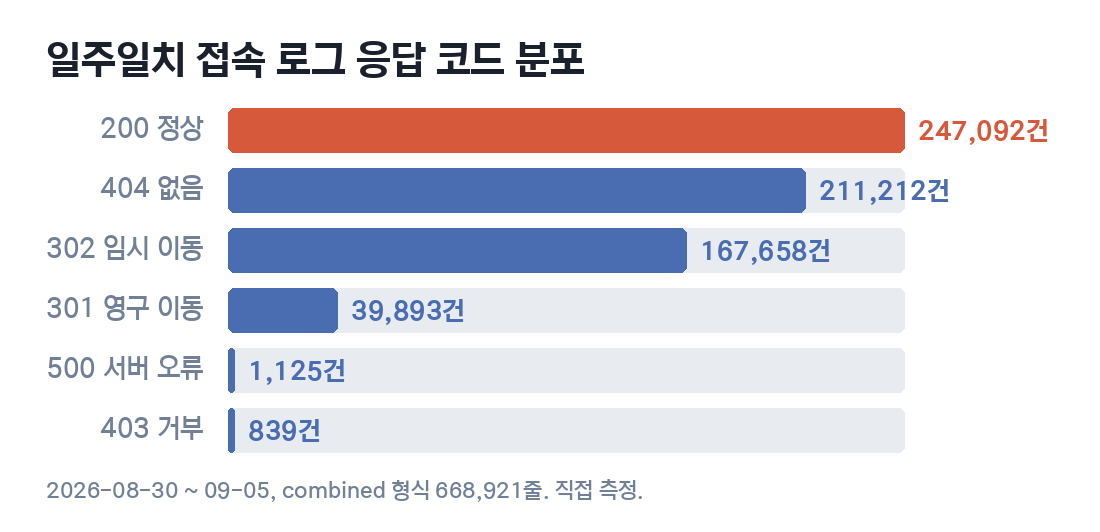
The number of 404 errors was only slightly less than the number of successful responses. Just the 404s took up 37,627,722 bytes in the logs. These requests came from 16,233 different addresses, originating from 4,340 different IP addresses. When I looked at the most frequent addresses, a clear pattern emerged.
- Requests hitting /wp/ and /wordpress/ and /blog/ — These look like automated checks to see if WordPress is installed in a subfolder.
- Requests like /wp/index.php and /wordpress/wp-json/batch/v1 — These are follow-up requests related to the same guessed addresses.
- /robots.txt — This accounted for 4,055 requests, likely from other sites hosted on this server.
- /free/null — This appears to be a request scanning old forum URL formats.
Three specific top IP addresses each made exactly 10,146 requests. This suggests a tool is cycling through addresses, changing only the path. Even if we block these requests, they will still show up in the logs, just as a 403 Forbidden error.
The Logs Don't Identify the Site Name
I tried digging deeper, but I hit a wall. This server hosts several different websites, but the log format doesn't have a field to specify the site name. Because of this, we can't tell which site generated the 211,212 404 errors.
Although there were 4,055 404s for robots.txt, both of our blogs responded normally to requests for robots.txt when I manually checked. This means those 4,055 requests belong to other sites, but this log won't tell us which ones. We're generating 199MB of logs a week, yet we can't answer the most basic question: "Which site is getting 404s?" I'll leave improving the log format for a future task.
The Takeaway
The two things I measured today are fundamentally the same issue. If you check just one configuration file, you'll see everything is correct. The log optimization settings are precisely written to exclude static files, and the cache settings are precisely written to apply a one-year duration to static files.
The problem arose when those settings overlapped with other configurations, and when the target for those settings was an address without a version number. Because of this, you can't find the issue just by reading the configuration files.
The double logging was only discovered after I counted the log files by type, and the caching problem became apparent after I applied the method of measuring transferred bytes to the access records, just like in the article at kilho.org.
What I fixed today was just one line in the log. This will reduce the size from 62.5MB per week to 250MB over four weeks. I didn't fix the caching issue. If I reduce the image cache duration, 36% of the re-requests will become even heavier, and adding version numbers would require changing the publishing process. I still have more testing to do to see which approach is better. However, I want to note that the current state means "an address that promises not to change for a year but actually could change."