
What's Hitting Your Server? Analyzing 404 Errors
I pulled the access logs from a server running WordPress for 35 days (August 9th to September 12th) and counted them by response code. Out of 2,977,553 requests, 404 errors accounted for 1,065,189, which is 35.8%. After the normal 200 responses (49.2%), the second most common code was "page not found." But when I broke down these 404 errors by path, nearly half—492,189 requests—were hitting one specific folder:
/.git/. And out of those requests, 4,917 weren't 404s; they were 200s. The server actually served the files. Here’s what I counted, what I blocked, and what I left untouched.
How the 1.06 Million 404s Break Down
This server hosts several sites besides the three WordPress sites, and all the access logs are mixed together in one file. So, the numbers below represent the entire server, not just one site. Here is how the requests that resulted in a 404 response code break down by path pattern.
| Path Pattern | Count | Percentage of 404s | Example Paths |
|---|---|---|---|
Starting with /.git/ |
492,189 | 46.2% | /.git/objects/3e/..., /.git/logs/refs/... |
Containing .php |
261,248 | 24.5% | /admin.php, /phpinfo.php, /1.php |
Containing .env |
67,579 | 6.3% | /.env, /.env.production, /api/.env |
| Other | 244,173 | 22.9% | /wp-json/batch/v1, /wp/, /.aws/credentials |
| Total | 1,065,189 | 100% | 35.8% of all requests |
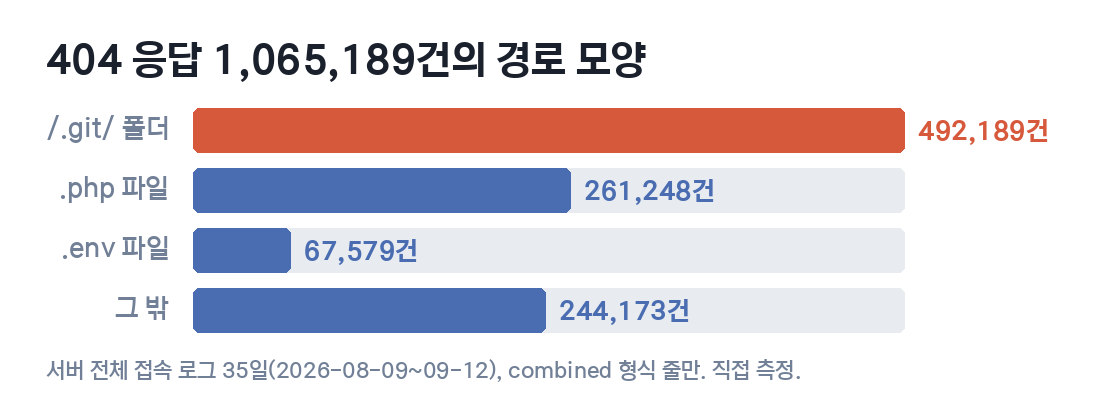
We tracked 16,009 unique IP addresses that received 404 errors. Of those, 6,852 (42.8%) never received any response other than a 404 over a 35-day period. These are addresses that only hammered non-existent paths without ever successfully loading a real page. The data shows that the total data transferred for these 404 errors was 1.02GB, which is only 4.5% of the total 22.47GB. While this represents one-third of the request count, the data volume is small. We'll explain why later.
497,946 Requests to .git: 89% Driven by a Single Tool
We saw 497,946 requests targeting paths under /.git/, which accounts for 16.7% of all requests to the server, including 404 errors. Out of every six requests, one was trying to access a source code repository folder. Drilling down further, /.git/objects/ received 404,775 requests, /.git/refs/ got 42,108, and /.git/logs/ had 40,371. There were 3,350 unique object hashes (like objects/3e/5c...). This sequence suggests an attempt to download the entire repository.
Looking at the User-Agent strings, one specific string—Mozilla/5.0 (Windows NT 10.0; rv:78.0) Gecko/20100101 Firefox/78.0—was responsible for 443,642 requests, or 89.1%. It appears to be a tool that is cycling through different IP addresses while using the exact string from Firefox 78 released in 2020. The second most frequent agent was git/2.40.0, accounting for 28,448 requests. This one is more straightforward; it looks like the git command itself was scraping the repository over HTTP. There were 1,754 unique IPs, with the top one making up 11.6% and the top ten making up 51.5% of the traffic. The peak activity occurred on August 12th at 1:11 AM, with 7,308 requests, or 122 requests per second.
4,917 Requests Returned a 200 OK Status
This level of activity is common noise we see on other servers. The real issue, however, lies in the distribution of the response codes.
| Response Code | Count | Meaning |
|---|---|---|
| 404 | 492,189 | Not Found |
| 200 | 4,917 | File Served |
| 301 | 489 | Moved to HTTPS |
| 403 | 335 | Forbidden |
| 500 | 15 | Server Error |
The paths that returned a 200 status code were: /.git/config (1,020 requests), /.git/HEAD (563 requests), /.git/refs/heads/master (226 requests), /.git/packed-refs (196 requests), /.git/logs/HEAD (193 requests), and /.git/index (190 requests). The total bytes served via 200 responses amounted to 64.4MB, and the /.git/index file alone was 338KB. Since the index file contains a list of every file in the repository, receiving this file essentially gives an attacker a complete map of what files exist in your document root.
Since the logs don't tell you which site is responsible (they don't show the hostname), I checked manually. I found nine sites with a .git folder under the document root, and when I requested /.git/config on four of them, I got a 200 response with 266 bytes. Three of the WordPress sites didn't have a .git folder, so they weren't counted. The vulnerability wasn't in WordPress; it was in another site hosted next to it. Scanners hit every name on the same host, regardless of the host itself.
260,000 Requests for Non-Existent PHP Files: Only 19% Mention WordPress
The second biggest chunk of 404 errors came from requests for .php files. There were 14,161 unique paths and 4,114 unique IPs involved. Here’s a breakdown of the file names found:
| File Name | Count | Likely Meaning |
|---|---|---|
index.php |
15,341 | Guess of an installation folder, like /wp/, /blog/, or /wordpress/ |
phpinfo.php |
9,417 | Checking if server information is exposed |
about.php |
5,213 | Name of an uploaded web shell |
admin.php |
5,082 | Web shell or admin panel |
info.php |
3,566 | Variation of phpinfo |
wp-login.php |
2,037 | WordPress login from a different folder |
wp_filemanager.php |
1,589 | File manager disguised as a plugin |
eval-stdin.php |
1,433 | PHPUnit vulnerability (CVE-2017-9841) |
Out of the 261,248 requests, 50,701 (19.4%) contained "wp-" or "wordpress" in the path. The remaining 80% had names unrelated to WordPress, like 1.php, 222.php, k.php, or 3PJcpMFsD8B.php. This suggests someone might have planted a web shell, so they're cycling through the list of names. 61.4% of these requests had an empty User-Agent. Since neither browsers nor search bots send empty UAs, you can filter these out just based on that one piece of data.
When someone requests a non-existent file like .php, Apache doesn't realize the file is missing. Instead, it passes the request to PHP-FPM. PHP-FPM then logs a message like "Primary script unknown" in the error log and sends back a 404 error. Out of 197,501 lines in the error log during the same period, 188,834 lines (95.6%) were this exact message. This is why you might not see the actual error when you open the error logs.
Why Different 404s Have Different Costs: WordPress-Generated 404s Take 75ms
The server load from 1.06 million 404 errors varies depending on the URL structure. I tested three types of non-existent paths on a single WordPress site (kilho.org) and averaged the results across five requests for each type.
| Request | Response | Size | Time | Who Handled It |
|---|---|---|---|---|
/zz-none.php |
404 | 16B | 17ms | PHP-FPM returned file not found |
/wp-includes/ID3/ |
403 | 199B | 20ms | Apache (Directory listing disabled) |
/zz-none.txt |
404 | 55,096B | 75ms | WordPress rendered the 404 page |
/.git/config (Before fixing) |
404 | 55,096B | 73ms | WordPress |
/ (Comparison Home) |
200 | 103,403B | 149ms | WordPress |
Why WordPress Handles Requests for .git/objects
The rules in WordPress's .htaccess file essentially say, "If it's neither a file nor a directory, send it to index.php." Since /.git/objects/3e/5c… isn't a file or a directory, it gets passed to WordPress. WordPress then loads a theme and generates the entire 404 page (about 55KB) before sending it back. That's half the size of the homepage. On the other hand, requests ending in .php go straight to PHP-FPM via Apache, so WordPress isn't involved, and the response is just 16 bytes. In short, the cheapest 404 on this server is a non-existent PHP file, and the most expensive 404 is a non-existent text path hitting the WordPress site.
By working backward from the response size in the logs, we see that 41,867 of the 404s (3.9%) are over 1KB, while the remaining 96.1% are under 1KB. Since the WordPress 404 page is over 1KB even when compressed, only about 40,000 of the 1.06 million requests reached WordPress to generate a page. Even at 75ms each, that only adds up to about 52 minutes over 35 days. This isn't so much a burden as it is wasted effort, and this fix brings that waste down to nearly zero.
What I Changed and What I Didn't
Before this post, I hadn't touched my server settings. This time, I made one change. I'm laying out the reasoning and the results in a table for you.
| Item | Action Taken | Reason |
|---|---|---|
.git, .svn, .hg folders |
Denied across the entire server (403) | Four of the sites were exposing their .git/config files. There's no reason to make repository contents public on any site. |
.env file |
Denied across the entire server (403) | One site actually had a .env file. It returned a 500 error when requested, but the content wasn't exposed. This single rule fixed it for all. |
Requests for non-existent .php files |
Left as is | This already provides the cheapest response at 16 bytes and 17ms. Blocking the names would just result in the next name being requested anyway. |
| Blocking empty User-Agent strings | Left as is | While this could reduce 16% of 404s, it might accidentally block my own scripts (like cron jobs), so I decided to hold off. |
| IP blocking (fail2ban) | Left as is | We have 1,754 IPs, averaging 284 requests each. Even if I block the top 10, half of the traffic remains. |
That's everything I added to the configuration. DirectoryMatch applies to every file inside a folder, while FilesMatch targets individual files directly in the document root, like .env or .gitignore.
<DirectoryMatch "/.(git|svn|hg)(/|$)">
    Require all denied
</DirectoryMatch>
<FilesMatch "^.(env|git|svn|hg)">
    Require all denied
</FilesMatch>
After implementing these changes, when I ran the same requests again, .git/config changed from 200 to 403, and .env changed from 500 to 403. On the WordPress site, the 404 page for /.git/config, which was 55KB and 73ms, changed to a 403 response that was 199 bytes and 17ms. This is because Apache is now stopping the request before WordPress can even process it.
One more thing to note: these logs include a period where two different configuration files overlapped, causing the same request to show up twice. Since I only counted the 'common' format lines and excluded the duplicates, the numbers above reflect the actual request count. Initially, when I counted without regard to format, the .git requests came out to 950,000, and if I had kept that method, the numbers would have been doubled.
How We Measured This
- Data Source: We analyzed the access log (`/var/log/httpd/access_log`) and four rotated log files covering August 9 to August 12, 2026 (KST). We parsed 2,977,553 entries using a regular expression on lines with a combined format.
- Categorization: We sorted the lines that returned a 404 response code based on whether the path started with `/.git/`, contained `.php`, contained `.env`, or fell into the remaining categories. File names were aggregated after normalizing them to lowercase based on the last segment of the path.
- `.git` Deep Dive: For the `.git` requests, we tracked the count by response code, distribution by User Agent and IP, the peak count per minute, and the unique count of `objects/xx/hash`. We also added the total byte size of the responses for 200 OK codes to the log's transmission size.
- Error Log Analysis: We examined 197,501 lines across five `error_log` files during the same period, counting instances of `AH01071 … Primary script unknown` and `AH01276 Cannot serve directory` (which indicated directory listing was blocked, with 1,704 of those 4,675 instances being in WordPress folders).
- Response Cost: We made five average direct requests to kilho.org using `curl --resolve` from inside the server to measure the raw server response time, bypassing any external caching.
- Exposure Verification: We found 9 instances using `find /home/www -maxdepth 2 -name .git`. We then requested `/.git/config` for four different hostnames and confirmed a 200 OK response with 266 bytes. After adding security settings, we ran `apachectl configtest` and `systemctl reload httpd`, then re-verified the requests.
In a previous article about re-infection vectors, "Why Malware Keeps Coming Back Even After Deleting It," we discussed how if you can't find the entry point, the infection will return even if you clean it. The 190 instances of `.git/index` found in this log suggest that the 'where' might not be a WordPress site, but rather a repository folder belonging to another site on the same server. Locking down WordPress alone won't help if another document root on the same server is left exposed.