
Why WordPress Upload Fails on the 1st of the Month
On October 1st, I tried to upload an image for a blog post, but WordPress rejected it. The error message read, "Cannot create directory wp-content/uploads/sites/3/2026/10." I had plenty of disk space, and this exact process had worked without a hitch until September. The only thing that had changed was the month.
What was strange was another blog on the same server. It used the same WordPress installation and the same PHP process, yet on the morning of October 1st, that other blog had successfully created its October folder and was running fine. Since the code was identical and the executing user was the same, the problem had to be outside the code itself. So, I tracked it down and measured it.
Same Setup, Same User, Different Results
This server runs a WordPress multisite setup. I have three blogs, and their uploaded files are organized within a single tree structure. The first blog uses uploads/2026/, while the others use uploads/sites/2/2026/ and uploads/sites/3/2026/. When I lined up the status of these three year folders, the difference became immediately obvious.
| Year Folder | Owner | Mode | October Folder |
|---|---|---|---|
| uploads/2026 | apache:apache | 2775 | Automatically Created |
| uploads/sites/2/2026 | root:root | 755 | Failed |
| uploads/sites/3/2026 | root:root | 755 | Failed |
Both the web server and PHP run under the apache user. If you count the processes, you'll see three httpd processes and five php-fpm processes, all running as apache, and the FPM pool settings only have one line: user = apache. This means all three blogs use the same user when creating folders during an image upload. However, the year folder for the first blog has group write permissions open for that user, while the other two are owned by root with permissions set to 755. 755 essentially means only the owner can write to it.
Nothing Happened for Seven Months
I pulled the creation timestamps for the monthly folders from my first blog post.
| Folder | Creation Time |
|---|---|
| 2026/04 | April 1, 11:37:23 |
| 2026/05 | May 1, 09:19:12 |
| 2026/06 | June 1, 10:28:24 |
| 2026/07 | July 1, 09:37:22 |
| 2026/08 | August 1, 09:40:37 |
| 2026/09 | September 1, 09:42:09 |
| 2026/10 | October 1, 09:05:52 |
It was created on the 1st of the month in the morning for seven months straight. They all have the permission code apache:apache 2775. Since I never touched them, WordPress created them itself while processing the first upload of the month. This is normal behavior.
WordPress organizes upload paths by year and month. Only the very first upload on the 1st of the month requires a new folder; for the rest of the month, it just drops files into the existing folder. That's why, even if the permissions are wrong, nothing happens during the month—it only blows up on the day the month changes. The fact that it worked fine up to September wasn't because the permissions were correct; it was because the September folder already existed.
The Culprit Was Just One Folder
I stopped guessing and actually built the folders myself. I tried creating the November folder, which hadn't arrived yet, in three different spots, using the same user permissions as the web server.
| Attempted Path | apache Permissions |
www Permissions |
|---|---|---|
| uploads/2026/11 | Success | Success |
| uploads/sites/2/2026/11 | Permission denied | Permission denied |
| uploads/sites/3/2026/11 | Permission denied | — |
After checking, I deleted the folders I created. The result was clear. It wasn't WordPress, PHP, or a plugin. It was entirely about the owner and permissions of a single year folder. The failure message on October 1st was clearly telling me, "Check if the parent directory is writable," but I interpreted that parent as the entire uploads folder. The parent was just one year folder. I've experienced firsthand how important it is to read what the logs are telling you, as I did in How many lines of error logs are my fault?
You Don't Need to Check the Entire Upload Folder
When you search for permission issues, you almost always get the advice to change the upload folder to 755 or 777. So, I tried the opposite approach. The top level of the upload tree, the uploads/ folder itself, is set to root:root with 755 permissions, and if I try to create a folder there using the apache user, I get "Permission denied." Yet, my first blog ran perfectly fine for seven months.
This means you don't need to open up the entire top level. What WordPress needs to create every month is just one monthly folder inside the yearly folder, and the necessary write permissions are only for that single yearly folder. Setting the entire tree to 777 isn't fixing the problem; it's just opening up areas that don't need to be open.
What the middle number in 2775 does
The mode that actually worked wasn't 755; it was 2775. That leading '2' is the setgid bit. When this bit is on a folder, any files or folders created inside it inherit the parent folder's group instead of the creator's group.
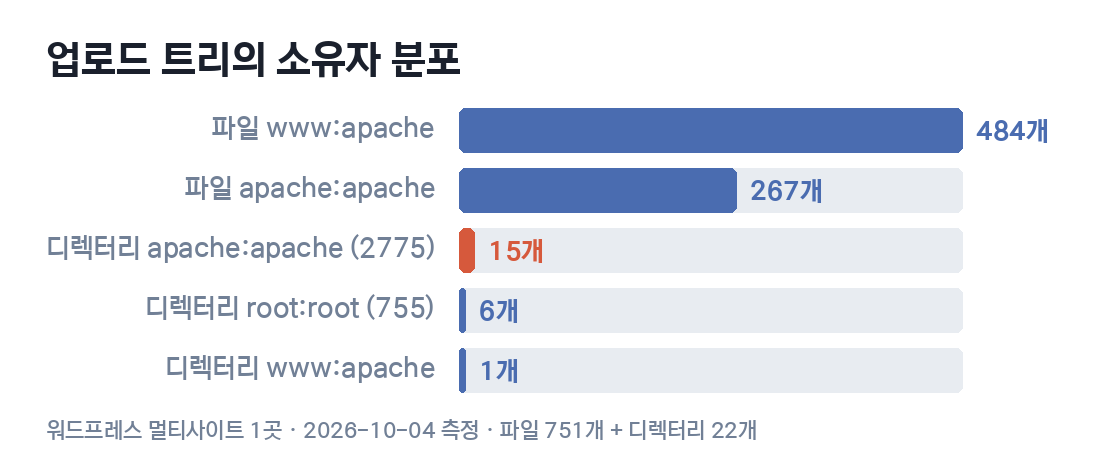
This is crucial on this server because there are two entities writing to the upload tree. When you upload via the web, apache writes it, but when you use command-line tools, www writes it. When I checked the actual file owners, I found 484 files owned by www:apache and 267 by apache:apache. Even though there were two users involved, the group was always apache. Without setgid, files created via the command line would have the www group, and the web server wouldn't be able to read them. In fact, when I tested creating a folder with www permissions for the November folder, it came out as www:apache. The owner was the creator, but the group came from the parent.
I counted how many files get generated in the upload folder separately in "Most WordPress Thumbnails Aren't Used," and all 511 of those files fall under this permission rule.
The Fix Created a New Problem
When things got stuck on October 1st, I quickly manually created the October folder. The publishing went through that day, so I marked it as resolved. However, when I re-examined the status, I discovered something.
Both blog year folders showed the time the status changed as October 3rd at 01:59:20. The time the October folder inside was created was at the exact same second. My act of manually creating the folder had set the parent year folder permissions to root:root 755. Previously, writing was possible because the September folder had been created on September 28th as apache:apache 2775. This meant that if I didn't create it myself, it was being generated automatically.
By manually fixing the blocked month, I had accidentally set up a situation where it would get blocked again in the next month. The fact that the test to create the November folder ended with "Permission denied" is proof. Simply patching the symptom without addressing the root cause wasn't a real fix.
Testing the Solution
Now that I knew the cause, I applied the fix. I changed the owner of both year folders to the web server user and updated the mode to 2775. It changed from root:root 755 to apache:apache 2775. It only took two commands, and I didn't touch any files.
The scope of the change was limited to the two year folders. The folders above them, like uploads/sites/ and the individual blog folders, remained at root:root 755. I already knew I didn't need to touch the top level because the first blog had been running fine for seven months.
After making the changes, I ran the same test again.
| Path Attempted | Before Fix | After Fix |
|---|---|---|
| uploads/sites/2/2026/11 | Permission denied | Success (apache:apache, setgid) |
| uploads/sites/3/2026/11 | Permission denied | Success (apache:apache, setgid) |
The newly created folders retained the setgid permission, which they inherited from the parent. I verified this and then deleted them, leaving the original monthly folders and their files untouched in terms of ownership and mode.
However, this is just a reproduction test for now. The real test is on November 1st. If WordPress creates the folder automatically when I upload the first image that day, then I'm good. If it gets blocked again, it means I misdiagnosed the issue. I'll run the test again that day and report back.
How I Investigated the Issue
I used just three commands to dig into this. First, I used the find command to list all directories in the upload tree, making sure to output the mode, owner, and modification time for each. Second, I used stat to check the last modification time for both the year and month folders, down to the second. Third, I actually created a folder for a month that hadn't arrived yet, using the permissions of the web server, checked the results, and then deleted it.
For running processes, I checked with ps, and I verified the FPM pool settings directly from the configuration files. To see the distribution of file owners, I used find to count only the owners. The only things I changed were two lines using chown and chmod, and after fixing it, I ran the test of creating the same folder one more time. I didn't install any extra tools.
Frequently Asked Questions
Why Does It Only Fail on the First of the Month?
It's because WordPress organizes the upload path by year and month. The only time a new folder needs to be created is during the very first upload of that month; after that, files just go into the existing folder. Even if the permissions are wrong, it doesn't show up during normal operation—it only becomes apparent when the month changes. If you don't upload on the first, the issue just gets pushed back to the actual first upload day.
Can't I Just Set the Upload Folder to 777?
It will work, but it's way too broad. Based on what I saw on this server, even if you set the very top level of the upload tree to 755 owned by root (making it inaccessible to the web server), as long as you got the year folder right, it automatically created itself for seven months. If you only have one spot that needs fixing, it's better to fix just that one spot.
Is the setgid Bit Absolutely Necessary?
If only one user writes to the upload tree, you don't need it. If there are two or more, you do. On this server, apache handles things via the web, while www handles command-line tools, and both create files in the same folder. Because of setgid, the group for files created by either process is unified under apache, which is why the web server can read them, no matter who created them. This is why there was no problem even though the owners of the 751 files were split into two different types.