
How IndexNow Works for SEO and Crawlers
When you publish content, there's a mechanism that tells search engines about your new address. It's called IndexNow, and major players like Bing, Naver, Yandex, and Seznam all use this system. I implemented this on my blog on October 11th. When I hit publish, a single URL was sent out, and I received a 200 response code. So, I checked the traffic records for 21 days to see if that notification actually sped up the crawling process.
For the two posts where I received a 200 response to the notification, BingBot showed up 10.9 days later, but for the other one, it never showed up even after 9.6 days. During the 21-day period, GoogleBot, Naver Yeti, and AdSense crawlers never visited any of the 42 posts on this blog. Meanwhile, GoogleBot visited the same server 35,733 times during that same timeframe. The very first bot to pick up the new content was ClaudeBot, which arrived about ten hours after publication.
What Happened After I Published?
I have three posts within the measurement window. The post from October 6th didn't use the notification system, so no one was alerted to it. The posts from October 11th and October 15th both sent out notifications the moment they were published.
| Post | Publish Time (UTC) | IndexNow | First Request | BingBot First Request |
|---|---|---|---|---|
| Oct 6 Post | 18:57 | None (Not Implemented) | ClaudeBot 10/7 05:04 (+10 hours 7 minutes) |
10/24 07:03 (+17.5 days) |
| Oct 11 Post | 03:21 | 03:21:16 Code 200 | ClaudeBot 10/11 14:21 (+11 hours 0 minutes) |
10/22 01:12 (+10.9 days) |
| Oct 15 Post | 09:54 | 09:54:46 Code 200 | ClaudeBot 10/15 19:57 (+10 hours 3 minutes) |
0 requests over 9.6 days |
For all three posts, the first visitor was ClaudeBot, and the time intervals were very similar: 10 hours 3 minutes, 10 hours 7 minutes, and 11 hours 0 minutes. The difference between the posts that sent notifications and those that didn't isn't apparent here. Furthermore, a second request came about 45 minutes after the initial one for all three posts. That second request came through a short URL, which I'll explain later.
I sent another notification batch. On October 11th at 3:06 AM, I sent all 49 existing URLs to the system and received a 202 code. The day after that, I saw 4 requests from BingBot. Since the average for the day before the notification was 3.1 requests, sending 49 URLs at once didn't show a clear numerical difference.
Which Crawlers Visited My Content Over 21 Days?
| Crawler | Total Requests | Pages Scraped (out of 42) | First Request Date | Last Request Date |
|---|---|---|---|---|
| bingbot | 85 | 29 | 10/4 08:46 | 10/24 23:55 |
| Ahref sBot | 58 | 42 | 10/4 03:19 | 10/23 06:39 |
| Applebot | 57 | 42 | 10/9 01:32 | 10/20 00:56 |
| SemrushBot | 52 | 42 | 10/4 20:45 | 10/24 14:21 |
| GPTBot | 30 | 21 | 10/14 17:11 | 10/23 15:45 |
| ClaudeBot | 6 | 3 | 10/7 05:04 | 10/15 20:42 |
| Amazonbot | 4 | 4 | 10/4 12:31 | 10/18 19:46 |
| PerplexityBot | 1 | 1 | 10/18 12:29 | 10/18 12:29 |
| Googlebot | 0 | 0 | — | — |
| Yeti (Naver) | 0 | 0 | — | — |
| Mediapartners-Google (AdSense) | 0 | 0 | — | — |
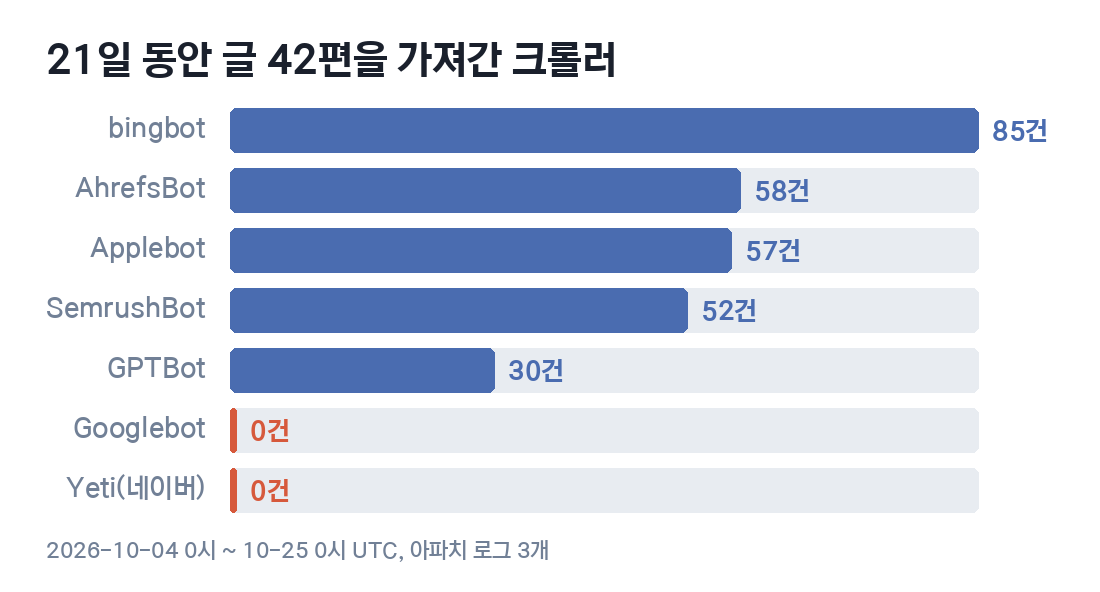
The traffic comes in a couple of different ways. Ahref sBot, Applebot, and SemrushBot all scraped all 42 posts, but they only visited each post about 1.2 to 1.4 times—they just skimmed through and left. Bingbot, on the other hand, visited every single day over the 21 days (making 2 to 8 requests daily), but it only managed to grab 29 posts, leaving 13 posts untouched. GPTBot hit the site in bursts on the 14th, 18th, and 23rd, collecting 21 posts. Looking at the timestamps, the requests overlapped by minutes, suggesting it wasn't visiting posts individually but rather grabbing them as it crawled the site.
When Googlebot and Yeti show 0 requests, it doesn't mean they never came to this server. Over that same 21-day period, the entire server received 5,017,907 requests, of which Googlebot accounted for 35,730 and Yeti accounted for 401. This server hosts other sites too, and both crawlers directed their requests to those other places.
The Crawler That Read the Sitemap Most Didn't Read the Post List
WordPress creates sitemaps in two layers. The main index, wp-sitemap.xml, acts like a table of contents, while the actual post URLs are listed in wp-sitemap-posts-post-1.xml. If a crawler only reads the table of contents, it won't know about any new posts.
| Crawler | Table of Contents File | Post List File | Time to First Crawl of New Post |
|---|---|---|---|
| ClaudeBot | 384 | 0 | 10 hours |
| GPTBot | 42 | 0 | — |
| bingbot | 39 | 37 | 10.9 days |
| Ahref sBot | 20 | 19 | — |
ClaudeBot read the table of contents 384 times, visiting it about 18 times a day. However, it never opened the post list file during the 21-day period. This tells us that the path it found for new posts wasn't the sitemap. Based on the server logs, we can't tell you what that path was. On the flip side, even though Bingbot read the post list file 37 times, it took 10.9 days to actually grab a new post. Knowing the address is different from actually fetching the content.
Since three domains share the same path, we can't break down the sitemap requests by individual site. This table shows the total numbers for the entire server.
Crawlers Fetch the Same Post Twice
WordPress automatically adds a short URL, like one ending in ?p=number, to the post header. When a crawler hits this short URL, the server redirects it with a 301 status, and the crawler makes another request. Over the 21 days, there were 231 requests coming through this short URL, and every single one resulted in a 301 redirect.
Both of the new posts we tracked were visited a second time via this method. The first visit happened about 45 minutes after the initial one, and then it fetched the full content again while including the short URL in the referrer. This means we're sending the same post twice, which results in four requests for every one post. This number grows as you add more content.
It's Not That I Blocked Googlebot
First off, I checked to see if I had blocked anything. My robots.txt file only blocks the /wp-admin/ area and points to the sitemap. Over the 21 days, I received zero 403 errors from Googlebot. There were no requests coming through at all.
There is another blog on this same server running the exact same WordPress setup. The themes and settings are identical. While the post URLs look similar across both blogs, the image paths are different because of the numbering, so I can tell them apart in the logs.
| Image Path | Googlebot | Mediapartners-Google | bingbot |
|---|---|---|---|
uploads/sites/2/ — This Blog |
0 | 0 | 79 |
uploads/sites/3/ — Other Blog on Same Server |
66 | 637 | 62 |
Googlebot crawled images from the neighboring blog 66 times. Of those, 38 were 304 responses, meaning it was asking if the image was the same as one it already had cached. So, it already had them. The AdSense crawler hit this blog 637 times. For this blog, both counts are zero. Bingbot visits both sites at roughly the same rate. I can't tell for sure just from the logs. Possible reasons include verification status, review status, or when the site was first created.
Only One Hit in Search Over 21 Days
For the 42 posts, we received 1,783 responses over 21 days. Out of those, only one response had a search engine listed in the referrer—it was a request from Bing.
It's hard to believe the rest are human activity. A massive 718 responses, which is 40.3% of the 1,783, were all concentrated on a single post. This came from 23 different IPs using the same browser string, hitting just that one post every single day without fail. I mentioned before that distinguishing between requests that claim to be a browser and filtering out human activity from logs is tricky (In the 34,000 requests claiming to be from Google, only 19 were human).
What These Numbers Don't Tell You
We only sampled three posts. We can't draw any firm conclusions about the effectiveness of IndexNow based on just two posts that were notified and one that wasn't.
While Bing's daily requests increased from an average of 3.1 before notification to 4.5 after 14 days, the daily fluctuations between 2 and 8 make it hard to pinpoint the exact change. Plus, we added two more posts during that period, which is another factor to consider.
We only counted 42 out of 46 posts. Four posts had URLs that overlapped with content on another blog, causing both sites to return a 200 response. For one of those four posts, there were 3 requests from Googlebot. Since we couldn't determine which blog scraped the content, we excluded it from the count. Therefore, the zero Googlebot hits refers specifically to the 42 posts where we could definitively track them.
Crawling is not the same as indexing. When a crawler "gets" something, it means it downloaded the file, not that it appeared in search results. Whether or not something gets indexed isn't recorded in the server logs.
Crawler names are self-reported. We categorized them based on the User-Agent string and didn't verify them with IP lookups. Since we already know there are many requests impersonating Googlebot, this zero count actually leans toward us successfully filtering out the impersonators.
What I'm Measuring Next
I'm going to run the count again on November 15th, using the same time window. I'll be looking at four things: whether Bingbot has picked up the remaining 13 posts, if Googlebot is still showing zero hits, if Yeti is crawling after I add it to Search Console, and how long it takes for the next new post to be indexed after publishing. I'm not touching the short URLs that are being hit twice right away. Fixing that would break the comparison, and the 231 requests are way too much load for the server.
How I Counted It
The window I used was 21 days, running from midnight on October 4, 2026, to midnight on October 25, all in UTC. Since the live log files keep growing while I'm counting, I didn't use them. Instead, I used three archived, rotated files. These three files cover exactly that 21-day period. They total 1,355,147,195 bytes and 5,017,907 requests.
These Apache logs from my server don't have a domain field. Because three different domains share the same folder, I can't tell which site is making the request just by looking at the URL. So, I sorted them by the response code. The post URLs look like /number/, and by excluding the four posts with matching numbers, the remaining 42 posts are the ones that return a 200 OK on this blog, while the other two domains return a 404 or 301. I only counted the requests that returned a 200 for those 42 specific URLs, which means they belong to this blog. To check for overlaps, I requested all the same URLs across the three domains and checked the response codes. Since the multi-site setup separates things into folders based on the blog number, the path alone tells me which one it is.
For classifying the crawlers, I used the User-Agent string. I ran a script once to count how many times each crawler hit each post. Running the same log multiple times can cause the numbers to get skewed. I used this exact same method in my previous measurement after blocking things (Should closing xmlrpc.php reduce attacks?).
Frequently Asked Questions
Didn't success mean getting a 200 code from IndexNow?
It means the submission was received. It's a response saying they got the address, not a promise that they will crawl it. When I sent the request for 49 addresses at once, I received a 202, which also means "we've received it and put it in the processing queue." The numbers in this post show the gap that can open up between the initial submission and the actual request, which can be as much as ten days. Also, Google isn't a participant in IndexNow, so they won't receive the notification at all.
Why is it 42 instead of 46?
There are four posts whose addresses overlap with posts on other blogs hosted on the same server. Since the logs don't show the domain, there's no way to tell which site those four requests went to. If I tried to inflate the number, I would mix in requests from other sites. If I remove them, I get 42, and 42 is a number I can definitively track with response codes.
If Googlebot is at 0, why isn't writing more content the answer?
If it hasn't crawled anything in 21 days, adding more posts just increases the pool of things to be crawled. Other blogs on the same server are getting Googlebot to crawl their images, so it's not a server or theme issue. Therefore, the next steps aren't about writing more content; they are about submission and ownership verification. After doing that, if we run the measurement again, we can determine whether the change was due to the submission or the content itself.