
Should You Disable WordPress's xmlrpc.php File?
WordPress has a file called xmlrpc.php. This file acts as a gateway for external programs to post content or send pings. Nowadays, hardly anyone uses it for legitimate purposes; instead, it's mostly targeted by attackers who can spam dozens of passwords all at once. Because of this, you see a lot of advice telling you to disable it. However, I couldn't find any posts that provided hard numbers on exactly what changes and how much they change when you disable it.
On October 11th at 12:07 PM, I blocked access to xmlrpc.php on my server using a 403 Forbidden error. After about four and a half days, I checked the access logs. The number of unique IPs hitting the site was similar to before, hovering around 40 to 80 per day. But successful responses dropped from 334 per day to zero. Furthermore, I eliminated instances where a single IP would hit the endpoint over ten times—that number dropped from 96 instances to zero, and those 96 instances accounted for 52.7% of all requests.
What and When I Blocked It
I added three lines to the very top of the .htaccess file in my WordPress installation folder. Since Apache reads the file name before executing PHP, the PHP code never runs. I placed these lines above # BEGIN WordPress to make sure WordPress doesn't overwrite them when it regenerates its rules.
<Files "xmlrpc.php">
    Require all denied
</Files>
The file was changed at 12:07:31 PM on October 11, 2026. Because of this, I split my measurement period into three segments. For the pre-block period, I used a single archived log file covering seven days, from October 4th to October 11th at midnight. The period right before the block was from midnight on the 11th until 12:07 PM. The post-block period ran from 12:07 PM until 6:45 PM on October 15th, which is four days, six hours, and 38 minutes. For the post-block window, I counted entries from a copy of the logs taken at that time, which amounted to 1,279,369 lines. Since logs keep growing, the number changes slightly every time I recount.
Success Responses Dropped to Zero
My server logs don't keep track of which site made a specific request; multiple sites pile up in one file. So, I started using response codes to tell them apart. A 403 means my custom rules blocked it, so it belongs to my site. A 404 means some other site responded because that file doesn't exist. Before the block, 200 and 405 responses were coming from my site. This is because WordPress sends a 405 response for requests that aren't POST requests.
| Time Period | Duration | Requests Handled by My Site | Of Those, 200 OK | Avg. Requests Per Day |
|---|---|---|---|---|
| 10/4 0:00 ~ 10/11 0:00 | 7 days | 2,571 | 2,339 | 367 |
| 10/11 0:00 ~ 12:07 | 12.1 hours | 85 | 85 | 168 |
| 10/11 12:07 ~ 10/15 18:45 | 4.3 days | 316 | 0 | 74 |
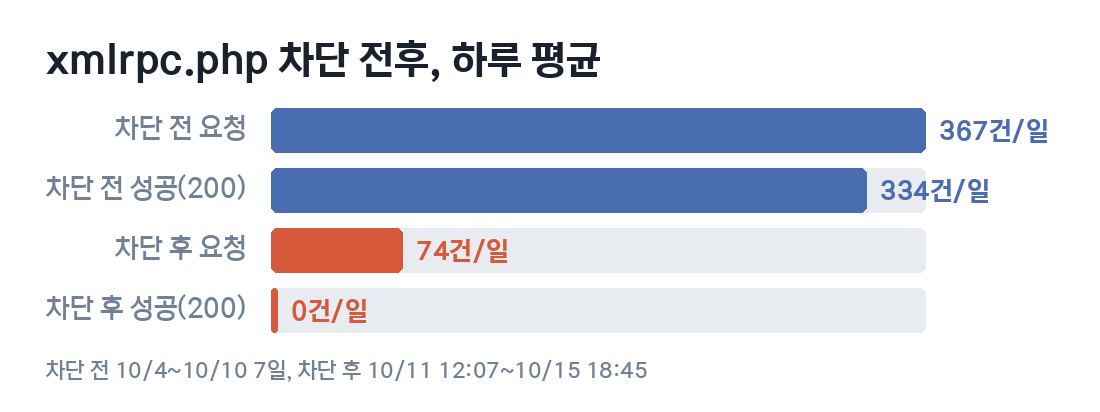
The 200 responses completely stopped after 12:07. For the next four and a half days, there wasn't a single one. This confirms that the rule is working, and it also proves that the 2,339 successful (200) responses before the block were coming from my own site, not some other place. The response size also changed. The average 200 response was 379 bytes, while the 403 response was 199 bytes.
The Requests Didn't Just Disappear
I expected that by blocking them, the traffic would stop, but that wasn't the case. If you count how many IPs hit the site every day, here's what I found. I excluded October 11th because it had a mix of both states.
| Before Blocking | IPs That Hit | After Blocking | IPs That Hit |
|---|---|---|---|
| October 4th | 81 | October 12th | 82 |
| October 5th | 47 | October 13th | 33 |
| October 6th | 45 | October 14th | 31 |
| October 7th | 132 | October 15th | 49 |
| October 8th | 119 | ||
| October 9th | 582 | ||
| October 10th | 41 |
Before blocking, the number of unique IPs ranged from 41 to 582. After blocking, it was between 31 and 82. These two ranges overlap. There's no evidence that bots are deleting these addresses from their lists after seeing a 403 error. Out of the 202 IPs that hit after blocking, only 20 were IPs that had also hit before blocking. It seems like it's not the same bots coming back; instead, a different IP is hitting the site each time.
But the Frequency of Hits Per IP Decreased
What actually changed wasn't the total number of unique IPs making requests, but how often a single IP was making those requests.
| Attempts Per IP | Before Blocking (927 IPs) | After Blocking (202 IPs) |
|---|---|---|
| 1 time | 60.2% | 61.4% |
| 2 times | 21.5% | 27.2% |
| 3 times | 5.6% | 7.9% |
| 4–9 times | 2.4% | 3.5% |
| 10+ times | 10.4% (96 IPs) | 0% (0 IPs) |
The percentage of IPs that hit only once is the same in both scenarios: 60.2% and 61.4%. For the IPs that hit once and were then rejected, they never seemed to plan on making a second request in the first place. The biggest change is at the bottom. Before blocking, there were 96 IPs that hit ten or more times, and the most active IP hit 88 times. After blocking, the most active IP hit only 6 times. The average number of hits per IP dropped from 2.77 to 1.56.
The Group That Used to Make Up Half the Traffic is Gone
Those 96 sources sent 1,355 requests. That accounts for 52.7% of the total 2,571 requests before blocking. Just 10.4% of all IPs were responsible for half of those requests. Of those 1,355 requests, 1,300 were POST requests, and they all got a 200 response. When a request gets a 200 back, they send another one, which is why we see patterns like 12, 30, and 88. Attacks that involve brute-forcing passwords need a back-and-forth conversation to work. A 403 error cuts that conversation off right at the start. After blocking, the top 7 most active sources sent only 34 requests combined, which is just 10.8% of the total.
Did They Just Move to Other Entry Points?
There's an old saying that if you close one door, they'll find another. So, I started tracking the number of successful 200 responses coming through the login page, wp-login.php, day by day to see if the activity shifted.
| Before Blocking | Login Attempts | After Blocking | Login Attempts |
|---|---|---|---|
| Oct 4 | 192 | Oct 12 | 270 |
| Oct 5 | 348 | Oct 13 | 160 |
| Oct 6 | 98 | Oct 14 | 338 |
| Oct 7 | 86 | ||
| Oct 8 | 219 | ||
| Oct 9 | 243 | ||
| Oct 10 | 107 |
The average before blocking over 7 days was 185 requests, but the average after blocking over 3 days was 256 requests. It went up. However, the daily numbers before blocking fluctuated wildly, from 86 requests to 348 requests. The 256 requests is an average that includes those spikes. So, this table alone doesn't prove they just moved elsewhere. I also looked at what the 202 sources that got blocked were doing on the server during that same period. Half of them, 101 sources, were hitting other paths, and the median for those 101 sources was 6 requests. The top 6 of those sources accounted for 81.8% of those requests. The IPs at the top were scanning for already installed backdoors using names like /this_is_a_new_hello_world.php and /wp-content/admin.php. This wasn't something started by the blocking; these were just scans looking for existing vulnerabilities.
What We Lost by Closing It Off
Out of 316 requests that returned a 403 after blocking, 313 claimed to be a browser. Since this endpoint isn't meant for browsers, all those claims are false. The remaining 3 requests were from WordPress clients. Two were from a pingback library, and one was from WordPress.com. So, what we lost by closing it off was external pingbacks and integration with WordPress.com. We don't use either of those features. If you are using them, you need to check that before adding these three lines.
When I counted requests in the same log that falsely claimed their origin via where they came from, I reached the same conclusion: you can't trust the self-identification.
What This Measurement Doesn't Tell You
Three things remain. First, while daily requests dropped from 367 to 74, we can't definitively say this is the effect of the block. The range of IP addresses hitting the site changed before and after the block, and only 20 IPs overlapped. We can't rule out the possibility that the attack campaign itself changed based on this log alone.
Second, the day on October 9th, when 582 requests hit the site, skewed the average upward. If we exclude that day, the pre-block daily average was 283 requests.
Third, since the log doesn't have a site distinction column, I attributed 404s and 301s to other sites. It's not a perfect separation because I categorized them based on response codes. I faced the same limitations when counting requests sent out by WordPress.
What We'll Measure Next
I plan to measure again in the same way on November 1st. I'll be looking at three things: whether the number of IPs hitting the site more than 10 times remains zero, whether the number of unique IPs hitting the site falls outside the pre-block range, and whether the variation in wp-login.php login attempts exceeds the pre-block fluctuation. If it goes beyond the third point, then we can say the attack has moved.
Frequently Asked Questions
Why did you count 403 and 404 separately?
The access logs on this server mix requests from multiple sites, and there's no way to tell which site made the request. Since I could only implement rules for my own site, the 403 errors belong to my site. The 404 errors are responses from other sites because the file doesn't exist on them. That's why I only counted the 403 errors for my site.
Why include 405 in the pre-block numbers?
This WordPress file sends a 405 error for requests that aren't POST requests. So, the total requests that hit my site before blocking were 2,571 (combining 200 and 405). If I only counted 200s, that would be 2,339. When comparing before and after blocking, I needed to see all the requests that reached the file, so I included both. The fact that 405 errors dropped to zero after blocking confirms they were all responses from the same file.
Can't I just delete the file instead of blocking it?
If you delete it, it will reappear when you update the core. Also, the 403 error is generated by Apache just looking at the filename, so PHP isn't even running. Deleting it is the same as telling the server to do nothing. If you keep the file, you only have to delete three lines later if you ever need to use it for pingbacks or external integrations.