
Why Image Compression Isn't Reducing Load
Yesterday, while testing the static files on this blog, I found two issues. First, ten PNG files were saved without being properly compressed. Second, Apache was forcing gzip compression on all responses, regardless of the file type. I fixed both today. Those ten files went from 12.7MB down to 2.6MB, and the gzip compression on the images was gone.
When I re-tested the same URLs, the actual transfer size only dropped from 2,540,730 bytes to 2,528,074 bytes—a reduction of 12,656 bytes, or 0.5%. The 10.2MB I removed from the files barely showed up in the total transfer size. This is because the gzip was handling the compression for every single request originally. If I hadn't tested before and after using the exact same method, I might have just said, "I cut a 1MB file down to a quarter of its size," and stopped there.
Fix One: Re-saving Ten PNG Files
PNG uses zlib to compress pixels. At the beginning of each compressed block, there are two bytes that indicate the compression level. For the ten problematic files, this value was set to the lowest level. Essentially, they were saved without proper compression applied.
The only way to fix this was to re-compress the pixels without altering them. I handled the file structure directly, bypassing image editing tools. This is because using a tool introduces a chance of subtle pixel changes, which means the file wouldn't be truly "lossless." Here is the process I followed:
1. Extract the IDAT chunks and decompress them → This gives you the line data with filtering applied.
2. Remove the filters to get the original pixels → Save this as your baseline.
3. Re-apply the filters and compress using zlib 9.
4. Decompress the newly created file and compare it to the baseline from step 2 → Stop if even one byte differs.
5. Write the file and then read it back to compare it again.
All ten files passed the comparison in steps 2 and 5. The decompressed pixel data came out to 1,273,192 bytes, which exactly matches the value calculated from 652 × 488 × 4 bytes, plus one byte for the line filtering on each row.
| File | Before | After | Savings |
|---|---|---|---|
| image-260706133738 | 1,275,326B | 242,964B | 80.9% |
| image-260709184556 | 1,275,326B | 246,628B | 80.7% |
| image-260706133323 | 1,275,326B | 250,719B | 80.3% |
| image-260709190235 | 1,275,326B | 255,268B | 80.0% |
| image-260706121615 | 1,275,326B | 256,815B | 79.9% |
| image-260709190357 | 1,275,326B | 261,433B | 79.5% |
| image-260709185342 | 1,275,326B | 262,175B | 79.4% |
| image-260706185049 | 1,275,326B | 264,265B | 79.3% |
| image-260706122607 | 1,275,326B | 267,473B | 79.0% |
| image-260703192436 | 1,275,326B | 281,654B | 77.9% |
| Total | 12,753,260B | 2,589,394B | 79.7% |
The Filters Were Already Set Up Correctly
When you compress a PNG, you have to choose a filter for each line. You have to decide whether to only keep the differences from the left pixel or only the differences from the top line. If you choose wisely, the subsequent compression works much better. Since I thought some of the files might have been poorly saved, I tried recalculating all five options for every line to see if there was a better choice.
The results were exactly the same as the original. All 488 filter selections matched the original, so the final file sizes were identical down to the byte. For example, one image used the Paeth filter for 422 lines, Up for 63 lines, Sub for 2 lines, and Average for 1 line, just like the original setup.
The tool that created these files is essentially doing a lot of heavy lifting while skipping the easy stuff. Choosing five different options for each line is the hard part, and then setting the zlib level is just passing along one value. That one value wasn't set to the default.
It took about 4 seconds per image to save, but most of those 4 seconds were spent recalculating validation filters, not on the actual compression, which was much faster.
There's another bonus reduction. The original file was splitting the compressed data into 156 chunks. Each chunk had 12 bytes attached for length, name, and checksum. The new file has only one chunk, so we saved 1,860 bytes from those 155 extra wrappers.
The Second Fix: One Line of Configuration
On the Apache side, the very first line, which I checked yesterday, was the problem, according to the link I found.
#SetOutputFilter DEFLATE
AddOutputFilterByType DEFLATE text/html text/plain text/xml
    text/css text/javascript application/javascript application/json
    application/xml application/rss+xml image/svg+xml
I added application/xml because of the sitemap. Yesterday, the sitemap was going out gzipped not because it was on the list, but because of that first line. By removing that line, the sitemap will no longer be compressed. The list only had text/xml, but the actual response type was application/xml.
After making the change, I ran a syntax check and reloaded everything. I confirmed that HTML, sitemaps, robots.txt, and ads.txt are all still being served gzipped, and the compression indicator is gone from the images.
What Happens When You Re-Test the Same 23 URLs?
There's one thing we need to point out here. The related posts shown below the article are selected randomly. Because of this, the thumbnail that shows up when you refresh the same URL changes, and the entire page weight changes with every request. Yesterday, the page I tested had three of the problematic PNG files, but if I open the same URL today, I see different images. Comparing yesterday's page to today's page won't show the effect of the fix; it will just show the results of a random draw.
So, I kept the exact list of 23 URLs I tested yesterday and ran the same list again today.
| Item | Yesterday | Today | Difference |
|---|---|---|---|
| Total after uncompressing | 5,808,580B | 2,756,216B | -52.5% |
| Actual Transfer Size | 2,540,730B | 2,528,074B | -0.5% |
| Gzipped Responses | 21 | 13 | -8 |
| Gzip on Images | 8 | 0 | -8 |
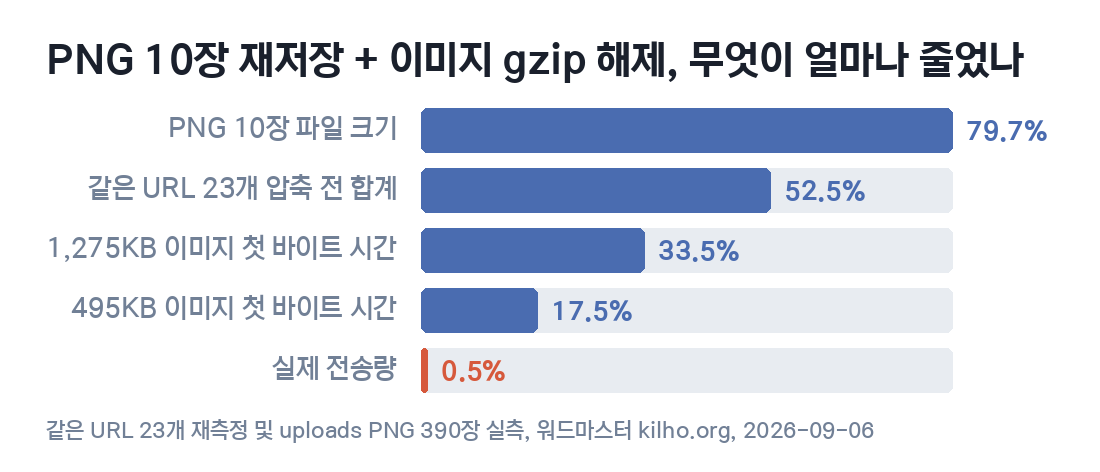
The difference between the left and right columns is the whole story here. Even though the file size dropped by 3MB, the amount of data transferred only decreased by 12,656 bytes. That 12,656-byte reduction wasn't because the file itself got smaller, but because the compression level applied to the file was higher than what Apache was using every time.
What Was Gained
You might wonder if there was no need to change anything if the transfer size stayed the same—but there was. The real gains are elsewhere.
| File | Yesterday (gzip) | Today | Yesterday (No Compression) |
|---|---|---|---|
| Graph (495KB) | 25.1ms | 20.7ms | 20.0ms |
| Thumbnail (407KB) | 25.2ms | 20.8ms | 21.9ms |
| Thumbnail (1,275KB → 267KB) | 34.0ms | 22.6ms | 18.9ms |
The time it took for the first byte to arrive decreased by 4 to 11ms for each image. This is because the server no longer has to calculate compression for every single request. Previously, loading one 495KB image took 16.3ms, and one 1,275KB image took 55.9ms—and that calculation repeats every single time you request the same image.
- Disk Space Saved: 10,163,866 bytes. The total size of 390 PNG files in the upload folder dropped from 70,135,947B to 59,972,081B. While the actual recovered space is less when you factor in backups, you can just delete the backups.
- Compression Overhead Removed from Images. If you applied gzip to this entire folder right now, you'd only see about a 0.2% reduction. Yesterday, it was 14.6%. With those ten files gone, it turns out the remaining 380 files weren't compressible in the first place.
- Less Work for the Browser. Images that arrive compressed have to be decompressed by the receiving end. Now, that step is gone.
What I Checked After Making the Fixes
Since I was changing image files, there were several things I needed to verify.
| Check Item | Method | Result |
|---|---|---|
| Were the pixels unchanged? | Byte comparison after disabling filters | All 10 matched |
| Are the files corrupted? | Downloading and checking checksum for each chunk | No issues found |
| Is the size information correct? | Updating WordPress attachment metadata | 10 items updated |
| Is the display normal? | Checking response for Home, Posts, and Sitemap | All returned 200 |
WordPress keeps separate size information for each attached file. When I only swapped the files, that old size data remained, so I corrected all ten entries. Since the width and height stayed the same, I didn't need to touch the image dimensions displayed in the lists or posts, nor did I need to adjust the srcset. I kept the original images in a folder labeled with the date.
What I Learned From This Test
It was harder to measure the results after making the changes than it was to measure before. The fact that the related posts were random was something I noticed even when counting queries on Kilho; back then, I was only looking at the count, so it wasn't a problem. But when I started measuring the bytes, it became clear that the same URL was returning different values on different requests. If the thing you're measuring changes, you can't prove any improvement.
The results themselves were different from what I expected. While shrinking ten 1.2MB images by a quarter seemed like a big deal, Gzip was already doing something similar upstream. There was a layer where the visible file size and the actual bytes being sent were different. What was reduced this time wasn't the transfer volume, but rather the calculations the server was repeating with every request, which is a kind of waste you can't see just by looking at file size.